Automated Lead Acquisition & AI Outreach Pipeline
An end-to-end B2B automation system for configurable lead discovery, contact enrichment, prioritization, AI-assisted personalization, approval-controlled delivery, reply tracking, and automated follow-ups.
Role
Automation Engineer & Systems Designer
Tech Stack
The Challenge
The outreach process required multiple disconnected steps: identifying relevant companies, finding usable contact data, researching businesses, preparing personalized messages, controlling delivery, tracking replies, and manually handling follow-ups.
The goal was to turn this into a structured automation system while preserving human control over outbound communication. Each stage needed to be reliable, state-aware, and independently operable without tight coupling between workflow phases.
Interactive Pipeline Topology
Eleven sequential stages, each implemented as an independent n8n workflow and coordinated through shared Google Sheets state. Click any stage to inspect execution rules and schemas.
11-Stage B2B Outreach System Architecture
Target country, keywords, limits, and operational states are ingested from a structured Google Sheet. Adding new campaigns requires zero workflow editing.
Schema validation prevents malformed country codes or negative volume limits.
{ campaign_id, target_country, keyword, max_leads, is_active }Configurable Lead Acquisition
Campaign configuration drives the entire acquisition stage. No hard-coded values — targeting parameters, processing limits, and workflow behavior are managed through a structured control sheet.

▸Main lead acquisition workflow: campaign config read → Outscraper API call → async wait → geographic filter → contact enrichment → priority assignment → persist valid records.
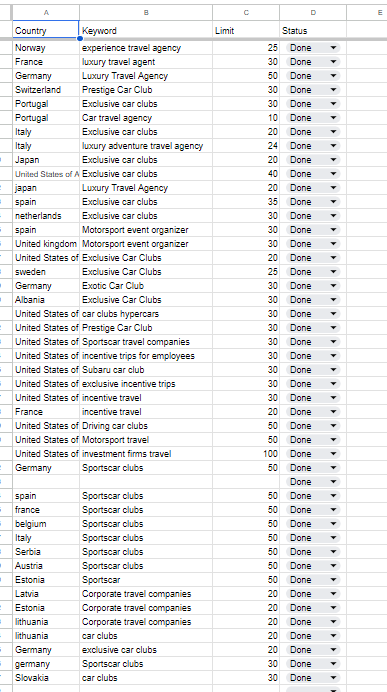
▸Campaign control sheet managing target country, search keyword, processing limit, and campaign state — no hard-coded parameters in the workflow itself.
Structured Lead Data
The lead database stores enriched company and contact information alongside explicit operational workflow state — enabling each pipeline stage to read and update only what it owns.
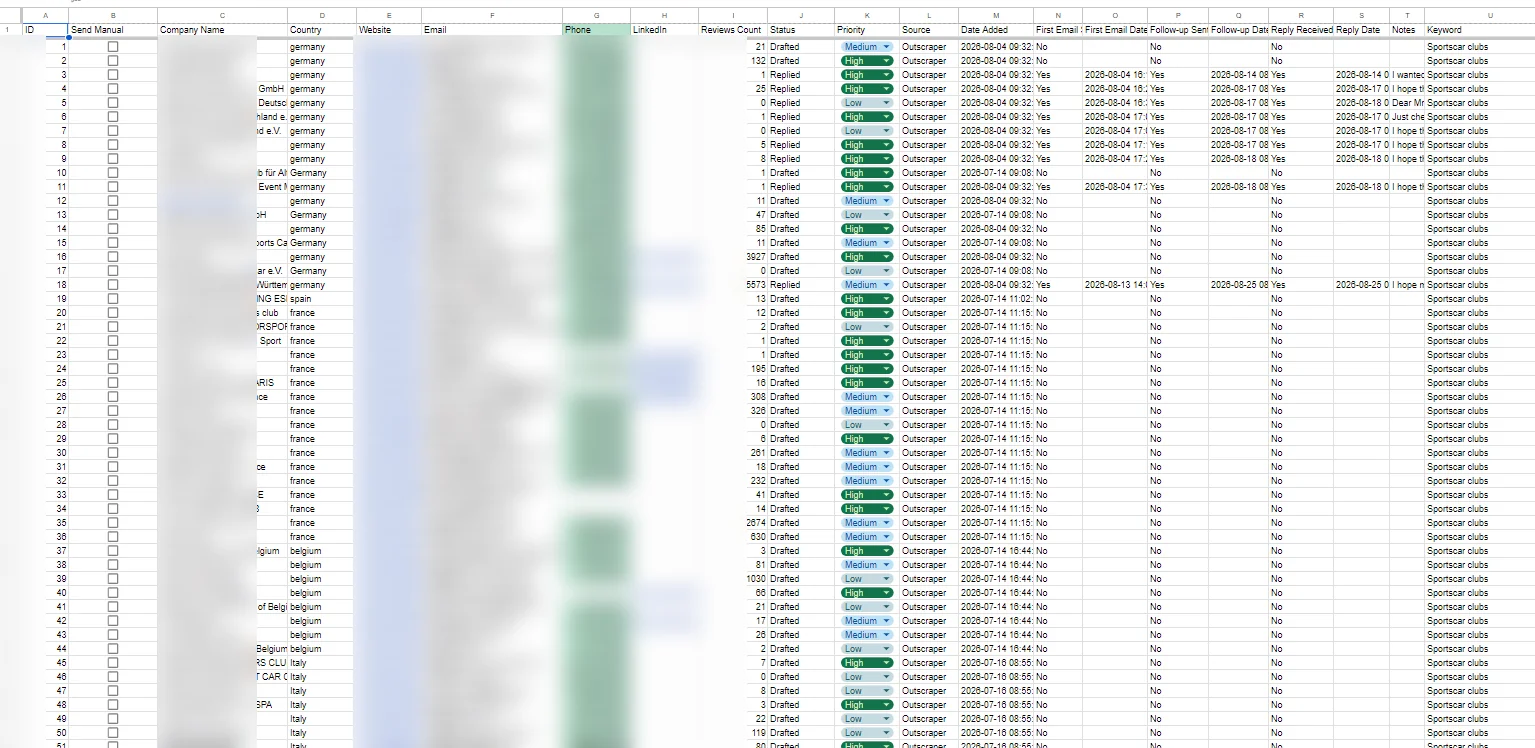
▸Sanitized master leads database — enriched company and contact data with operational state columns tracking priority, outreach status, reply state, and processing progress. Sensitive data redacted.
AI Personalization
Eligible leads are researched using available business and website context via Firecrawl. OpenAI prepares a personalized outreach draft — subject and body — which is stored for human review before any message is sent.
AI generation and delivery are intentionally decoupled
The AI draft workflow writes to the email log and stops. A separate human-controlled workflow handles actual message delivery only after explicit approval. This separation is a deliberate architectural decision.

▸AI draft workflow: fetch eligible leads → Firecrawl website scrape → structured context extraction → OpenAI draft generation → split subject and body → log draft row → update lead status to 'Draft Ready'.
Human-Controlled Delivery
Approved messages move through a dedicated delivery workflow. Row locking prevents duplicate sends. State is synchronized across the email log and leads sheet on completion.
Human approval required
Email Log Review column must = 'Approved'
Row locked during send
Status set to 'Sending' before Gmail dispatch
Duplicate-send prevention
Locked rows are skipped by all subsequent runs
Synchronized state update
Email log and leads sheet both updated post-send
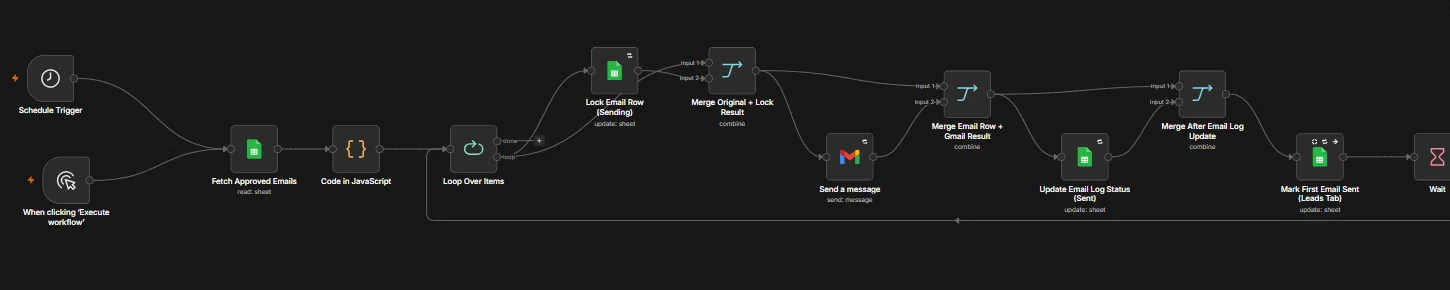
▸Delivery workflow: query approved emails → lock row with 'Sending' state → dispatch via Gmail → merge send result → update Email Log and Leads sheet status → mark first email sent flag.
Automated Follow-Up
When outreach has not received a reply within the configured wait window, the system can prepare contextual AI-assisted follow-up content and continue the existing Gmail thread — maintaining thread coherence.
The follow-up workflow identifies outreach records that have passed the elapsed wait period without a reply. It merges the original email context with AI-generated follow-up content, then sends within the same Gmail thread — preserving conversation continuity for the recipient.

▸Follow-up workflow: fetch email logs with no reply beyond wait window → filter eligible records → OpenAI generates contextual follow-up → reply to existing Gmail thread → update Email Log and Leads sheet.
Operational Evidence
The centralized email log provides a single source of truth for all outreach activity — draft state, review status, delivery status, timestamps, Gmail thread identifiers, reply state, and follow-up state.
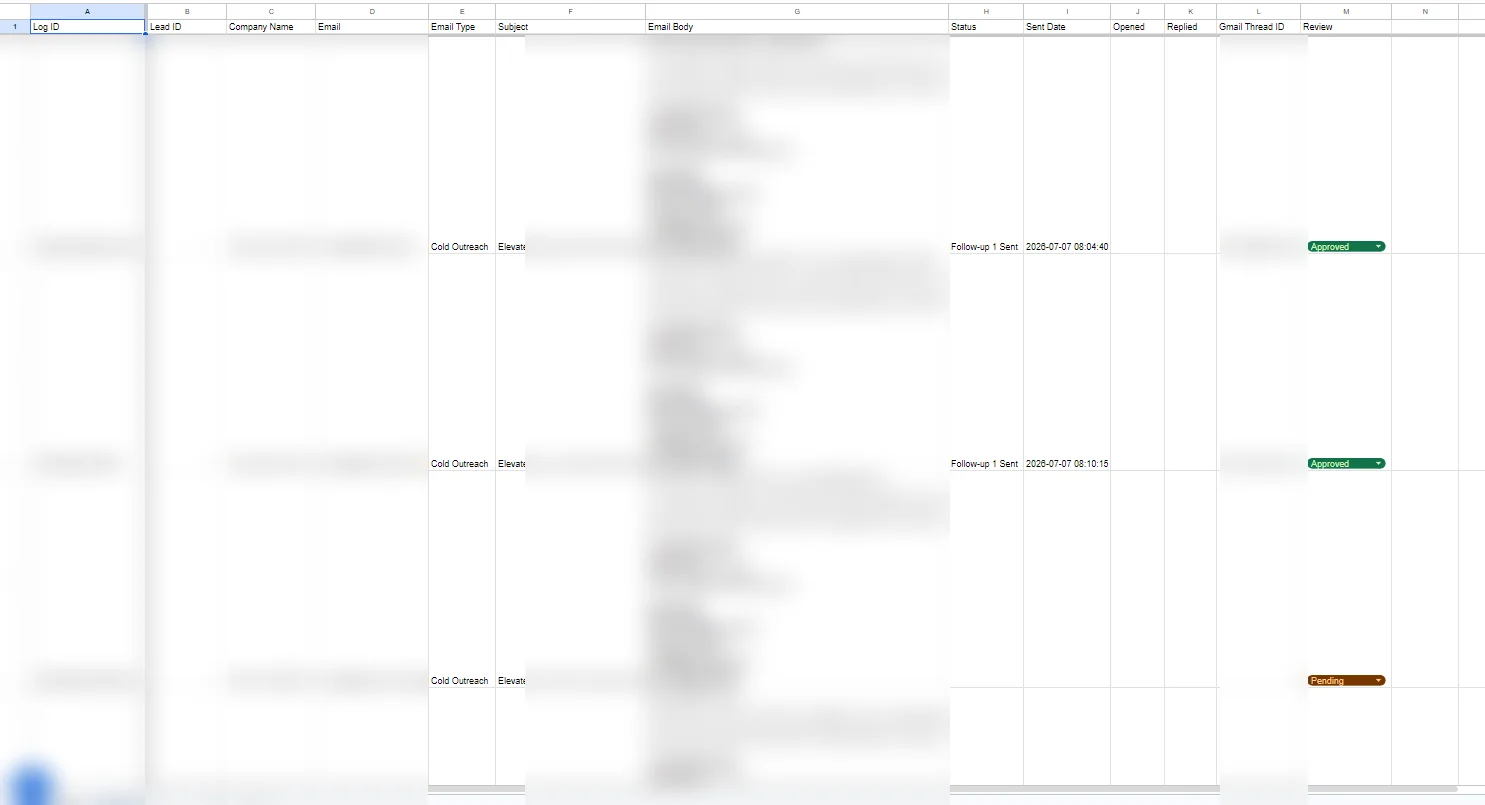
▸Sanitized email log: tracks draft state, review status, delivery status, sent timestamps, Gmail Thread IDs, reply state, and follow-up state. Sensitive email content and contact data redacted.
Operator Dashboard
A single live view over the whole pipeline, built inside the operational sheet. Every number is a formula reading the email log, leads, and campaign control sheets — nothing is typed in by hand — and stage status is shown in plain language, with no workflow or trigger jargon. The counts below match the dashboard screenshot supplied for this update (last activity 2026-10-29), not a claim about its current totals.
The dashboard also surfaces what not to do: pending drafts belonging to already-replied leads, duplicate emails, orphan approvals, and workflow errors are flagged separately in System health, so stale drafts are not approved blindly. In this screenshot those health values are: pending drafts for replied leads 0, duplicate emails 2, orphan approved history 10, workflow errors 2, reply count difference 0.
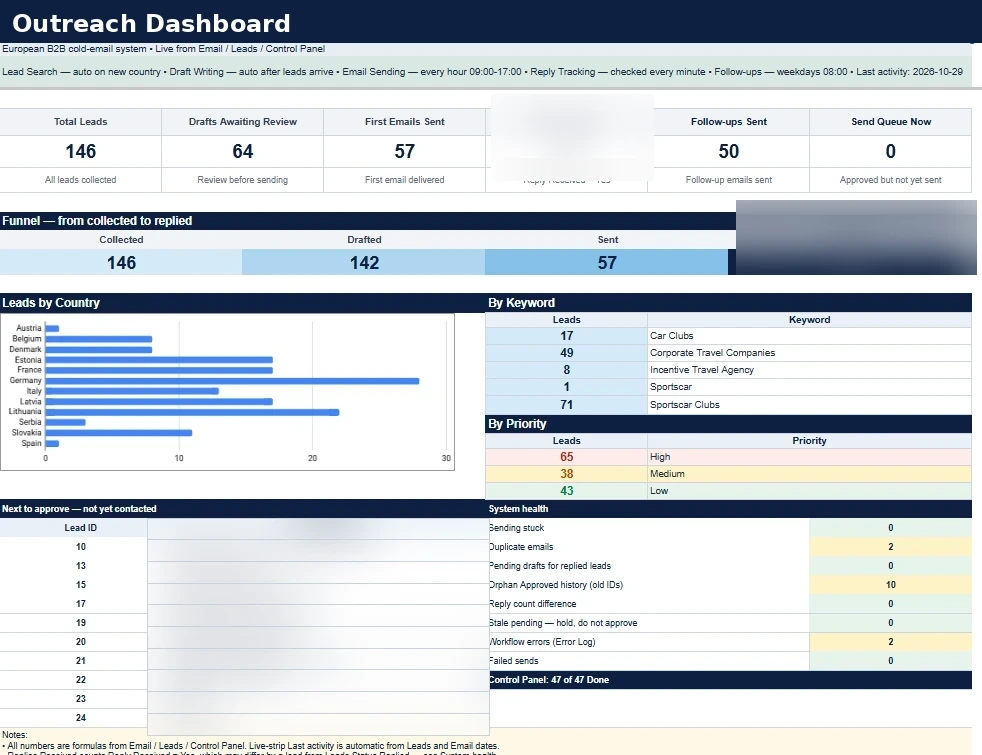
▸Sanitized operator dashboard — formula-driven KPIs, funnel from collected to replied, country, keyword, and priority breakdowns, next drafts to review, and system health checks. Company names in the review queue are redacted.
Engineering Decisions
Structural decisions that shaped the system's reliability, safety, and maintainability.
Configuration Over Hard-Coding
Campaign parameters — target country, search keyword, processing limit, and enabled state — are managed through a structured configuration sheet. Adding a new campaign segment requires only a new row, not workflow edits.
Campaign Control sheet → n8n reads config row → dynamic API parameters per run
Validation Before Persistence
Geographic filtering and contact validation are applied before leads are written to the database. Leads that fail validation are not silently discarded — they are written to a separate dropped-leads audit log with the reason (country mismatch or no email found), so nothing found during scraping disappears without a trace.
Post-API geographic filter → contact field validation → valid records to Leads; rejected records to Dropped Leads log with reason, keyword, and target country
Structured Operational State
Each lead record carries explicit pipeline state fields: priority score, outreach status, email log reference, reply state, and processing progress. State is read and written by each workflow stage independently.
Leads sheet columns track discrete workflow states; each stage reads and updates only its own fields
Human Approval Before Outreach
AI-generated drafts are written to a review log and held. A human reviewer sets the approval column before the delivery workflow is permitted to send. AI generation and actual transmission are intentionally decoupled.
Email Log Review column = 'Approved' → delivery workflow queries only approved rows before sending
Duplicate-Risk Reduction Through Row Locking
The delivery workflow immediately marks a row as 'Sending' before dispatching the message. Subsequent trigger evaluations skip rows already in this state, preventing concurrent duplicate sends. If a send fails, the row is marked failed instead of staying stuck at 'Sending', so a later run can retry only after the sent folder has been checked — a failed row is retried by clearing it to blank, and an invalid row is archived, with no automatic sweep.
Update row status to 'Sending' → send via Gmail → update to 'Sent'; on error, continue and mark 'Failed'; retry only after checking the sent folder
Position-Based IDs: Match by Email, Thread, and Fresh Row
Lead IDs in this sheet are position-based, not a stable identity, so they are used only as a draft-creation reference. Live writes match by the field that is actually reliable for that stage: email for the drafting guard, thread identifier for replies, and a freshly fetched row number for delivery and follow-up. Lead records can share an email address, so duplicate-email rows are skipped by delivery, reply, and follow-up, and rows are never deleted without cleaning the linked email rows together.
Draft guard by email; reply matching by thread identifier; delivery and follow-up by freshly fetched row number; Lead ID as draft reference only; scrape-time dedupe by email
Webhook Handoff With Schedule Fallback
A new campaign used to wait for the next scheduled poll. The control sheet now triggers acquisition directly when a campaign is marked pending, which then triggers drafting, while delivery stays on an hourly schedule so approved sends keep their pacing and human-approval gate.
Control Panel Pending → webhook → acquisition → webhook → drafting; delivery on hourly schedule 09:00–17:00, max 5 per run; schedules kept as rollback
Operator Dashboard With Health Checks
The operator used to check three sheets to know what needed attention. A single dashboard now shows formula-driven KPIs, funnel, country, keyword, and priority breakdowns, the next drafts to review, and health checks — including duplicate emails, pending drafts belonging to already-replied leads, and orphan approvals from older records — so stale drafts are not approved blindly.
Dashboard formulas read Email / Leads / Control Panel live; queue lists pending drafts for not-yet-contacted leads only; health checks surface duplicates, stale drafts, and count differences
Self-Copy and Bounce Guards
Reply detection used to treat the operator's own messages as customer replies, and follow-ups could target bounced leads. Reply detection now skips messages from the operator's own domain, and follow-ups reply only to the customer and skip bounced leads. This was verified with a real reply test, not only a workflow pin test.
Reply detection skips own-domain senders; follow-up replies to the customer only; bounced leads are corrected and excluded from follow-up
Failed-Send Recovery, Not Blind Retry
A stuck 'Sending' row must never be retried blindly, because the original message may already have gone out. Recovery is manual and evidence-first: check the sent folder, retry a genuinely failed row by clearing it, and archive an invalid row. Stale email rows are archived together with their lead rows so the two sheets cannot drift apart.
Check sent folder first → failed row cleared to blank for retry → invalid row archived → stale email rows archived; no automatic sweep
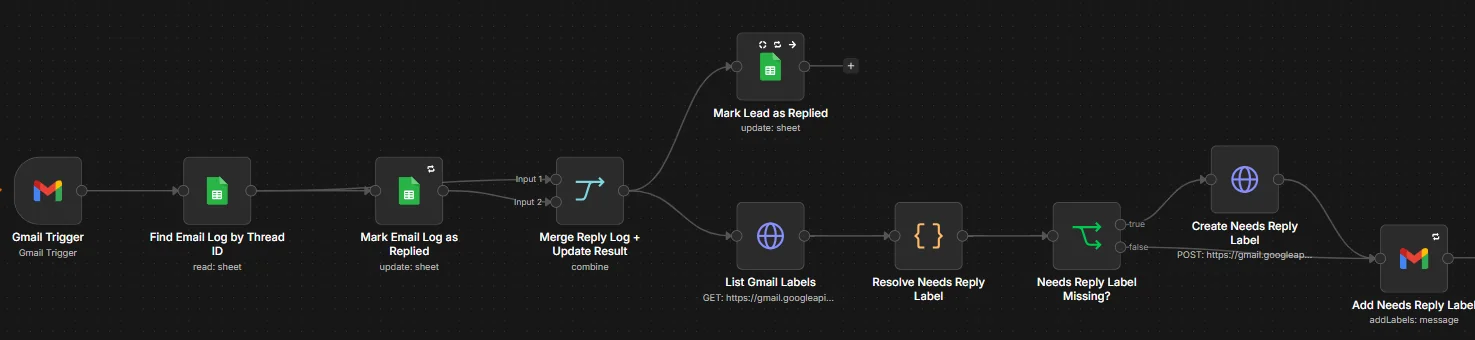
Thread-Aware Reply Tracking
Incoming Gmail replies are matched to the originating outreach thread using Gmail thread identifiers stored during delivery. Reply state is then written back to the lead record and email log.
Gmail Thread ID stored at send time → reply detection matches thread → updates reply state in both sheets
AI-Assisted Personalization With Reviewable Outputs
Website context is extracted via Firecrawl and passed to OpenAI for draft generation. The output is stored for human review before any message is sent, keeping human judgment in the loop at every outbound event.
Firecrawl scrape → context merged into prompt → OpenAI response → draft stored in log, not sent
Reusable Multi-Stage Workflow Architecture
Each pipeline stage — acquisition, drafting, delivery, reply detection, follow-up — is implemented as a separate n8n workflow. Stages communicate through shared sheet state, making individual stages replaceable or testable in isolation.
Independent n8n workflows per stage; shared Google Sheets as the state bus between all stages
What the System Changed
Connected lead discovery, enrichment, and outreach into one structured pipeline
Reduced disconnected manual handoffs between prospecting, messaging, and follow-up steps
Centralized campaign configuration, lead state, and email operational data in one place
Preserved explicit human control before any message leaves the system
Added reply-aware state tracking to the outreach cycle
Created a reusable, stage-isolated multi-workflow outreach architecture
Added a live operator dashboard with formula-driven KPIs, funnel, and health checks
Replaced Lead-ID-only matching with email, thread, and fresh-row matching and an existing-draft guard to stop duplicate drafts
Logged rejected leads with reasons instead of silently discarding them
✶ Aggregate operational counts only (leads processed, drafts, sends, replies). No ROI figures or conversion rates are represented.
Tech Stack
n8n
Workflow orchestration — all pipeline stages
Outscraper
Lead discovery — business data extraction
Google Sheets
Operational state — campaign config, leads DB, email log
OpenAI
AI personalization — draft generation and follow-up content
Gmail
Delivery channel — send, reply detection, thread continuity
Firecrawl
Web research — structured site content extraction per lead
Interested in a similar architecture for your team?
Discuss a Project